ext-scan
A local security scanner for VS Code & Cursor extensions
TypeScript · Node.js CLI · Claude Haiku API · Jest · GitHub Actions
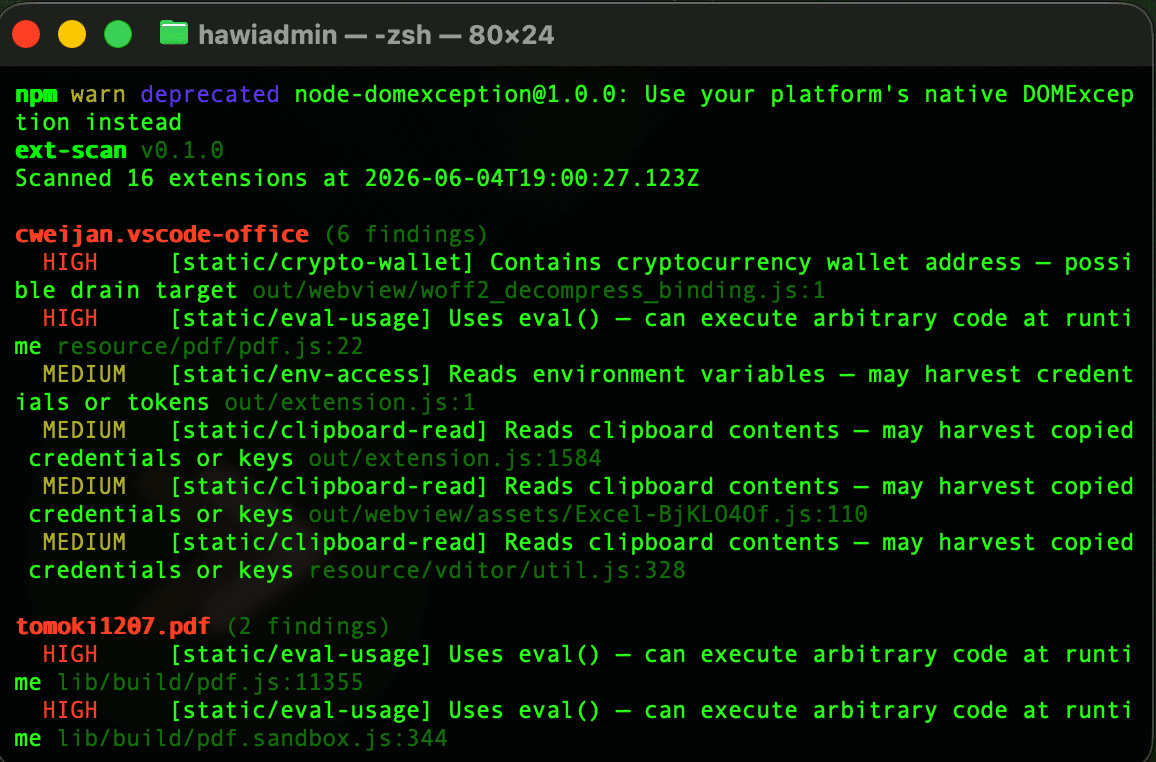
The Problem
VS Code extensions run with full access to your files, your network, and your saved logins. Campaigns like GlassWorm, Anivia Stealer, and a fake Nx Console have already hit thousands of developers through booby trapped extensions. Most developers have no way to audit what is actually installed in their editor.
An extension is a small add on that bolts extra features onto a code editor like VS Code. Because it runs inside the editor, a malicious one can quietly read your files and your passwords.
What I Built
A tool you run from your terminal that scans every VS Code and Cursor extension you have installed, across three layers.
Running it from the terminal just means you type a short command instead of clicking around a window. That makes it fast and easy to bolt onto other tools.
-
Catalog layer. Matches what you have installed against a hand built list of 77 known bad extensions, covering GlassWorm v2, Anivia Stealer, TeamPCP, and other live campaigns.
-
Static analysis layer. A set of 8 pattern rules that flag suspicious behaviour, like reaching for credentials, sending data out, hidden or scrambled code, and targeting crypto wallets. Extensions from trusted publishers have their warnings softened to cut down on noise.
-
AI deep scan layer. Sends the source of untrusted extensions to Claude Haiku for a behaviour read, catching threats that simple pattern matching misses.
Static analysis means inspecting the code without running it, like proofreading a recipe for dangerous steps instead of cooking the meal. The AI layer is a second opinion from a language model for the cases that are too subtle for fixed rules.
Usage
npx ext-scan              # quick scan
npx ext-scan --deep       # include AI analysis
npx ext-scan --json       # machine-readable output
npx ext-scan --no-info    # hide trusted publisher noise
Stack
- TypeScript
- A Node.js tool you run from the terminal, published on npm
- Jest, with 37 tests
- Claude Haiku for the AI scan layer
- GitHub Actions, running the test suite on Ubuntu and macOS across Node 20 and 22
npm is the public library where developers share and install tools, so anyone can run mine with one command. GitHub Actions reruns all my tests automatically every time I change the code, which catches bugs before release.
Open Source Contribution
I submitted PR #20 to Perplexity's Bumblebee, adding a list of 73 threat entries for editor extension campaigns. Bumblebee could already find extensions, but it had no data on the GlassWorm wave of attacks.
Open source means the code is public and anyone can propose improvements. A pull request is a proposed change that the project owners review and choose to accept. Getting one into a Perplexity project is outside validation of the work.
Key Decisions
- Three layers, on purpose. The catalog catches known threats instantly, the pattern rules catch suspicious unknown extensions, and the AI catches what fixed rules cannot. Each layer adds cover without slowing the one before it.
- Soften, never hide. Rather than trusting some publishers blindly, findings from trusted publishers drop in severity instead of disappearing. Nothing is ever quietly hidden.
- Built for the terminal, no app window. Security tools should be easy to script. Clean output that other programs can read means ext-scan slots straight into a developer's existing setup.
Concept Studio