Landed Cost Estimator
Turns a fragile import cost spreadsheet into a guided quote with an animated cost breakdown
Next.js · TypeScript · Supabase · Vitest · Playwright · Vercel
The Problem
An importer's real cost is never the sticker price. By the time goods land they have picked up duty, VAT, currency swings, port fees, shipping, and inland transport, and most small importers track all of that in one fragile spreadsheet that only its author understands. One wrong cell and a shipment that looked profitable is not. I took a working version of that spreadsheet and turned it into a tool anyone on the team can use without fear of breaking it.
Landed cost is what a product actually costs once it reaches your door, not just what you paid the supplier. It is the number that decides whether an import is worth doing, and it is easy to get wrong by leaving a fee out.
What I Built
A guided flow that takes a shipment from a few questions to a clear, defensible number.
-
Guided questionnaire. Walks the user through the shipment step by step instead of dropping them into a grid of cells, so there is no way to miss a field that changes the answer.
-
Server computed cost. The landed cost is worked out on the server: duty, VAT, live currency conversion across several currencies, port fees, shipping, and inland transport. The formula and the rates live in one authoritative place, not scattered across a spreadsheet.
-
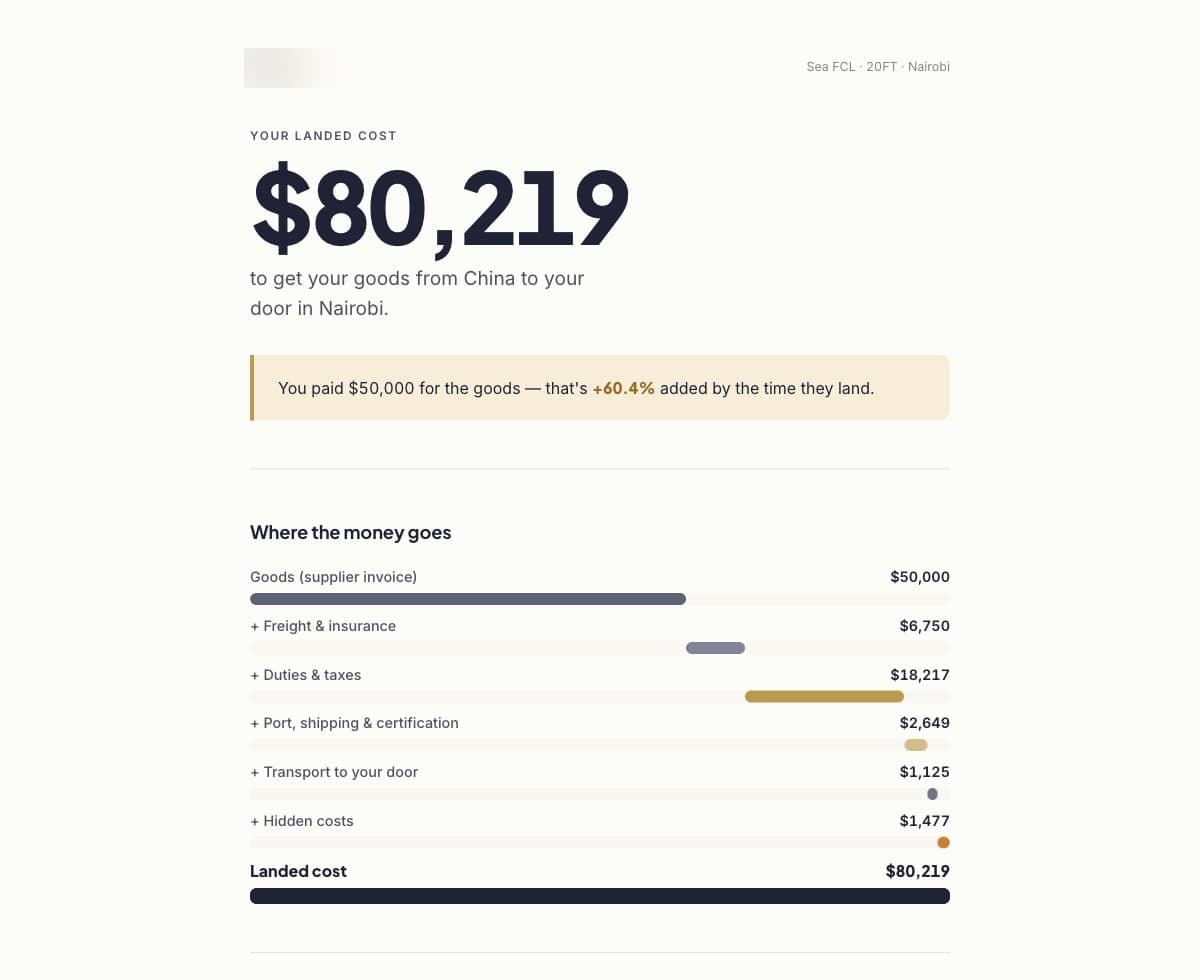
The reveal. The result is not a static table. Totals count up, a waterfall breaks the price into its parts, callouts surface the hidden fees and the VAT most people forget, and a savings line shows what the tool caught. The user can save the quote or export it to PDF, and a methodology page explains every number.
-
Accounts and admin. Magic link sign in with saved quote history, plus an admin panel with a classification queue and editors for the currency and duty rates, so the numbers stay current without touching code.
A waterfall is a chart that starts at one number and shows each fee stacking on top until it reaches the final total, so you can see exactly where the cost comes from rather than just the end figure.
Stack
- Next.js and TypeScript
- Supabase for the database, auth, and saved quotes
- Vitest and Playwright, with 50 unit tests and 4 end to end tests covering the full guest flow
- Vercel, deploying automatically
Key Decisions
- Compute on the server, never the client. The whole point is a number you can trust, so the calculation and the rates run server side where they cannot be edited from a browser. The client only ever asks for the answer, it never does the maths.
Doing the maths on the server means the real formula stays on a machine the user cannot see or change, so two people entering the same shipment always get the same trustworthy answer.
-
Full tool first, then one big moment. I built the entire path end to end before polishing, then spent the polish on a single reveal that makes the value obvious in a few seconds. The hidden fee and savings callouts are the hook, and they only work because the numbers underneath them are already right.
-
Tested like it handles money, because it does. 50 unit tests on the calculation and 4 end to end tests on the guest journey, because a landed cost tool that is occasionally wrong is worse than no tool at all.
models.dev Rankings